 Keavon Chambers
a708a54492
Keavon Chambers
a708a54492
* Add rank polymorphism node audit classifying all 271 nodes

* Implement StaticType for Item<T>

* Generate Item and mapped List wire variants for nodes declaring an Item<T> primary input

* Migrate nine nodes to Item element-wise kernels, dissolving the blending trait boilerplate

* Document the Item kernel implementation and staging plan

* Route Item<Vector> through TaggedValue::TypeDefault

* Add executor integration tests covering the Item and List wire variants

* Collapse element-wise Item/List wire pairs to the List form for conversion insertion

* Migrate sixteen vector modifier nodes to Item element-wise kernels

* Migrate Sample Image, Extend Image to Bounds, and Dehaze to Item element-wise kernels

* Fix bevel_with_transform test to actually exercise the transform attribute

* Implement From<T> for Item<T>

* Register PromoteNode rank adapters wrapping bare values into Item wires

* Insert PromoteNode adapters for Item/List wire pair fields in the preprocessor

* Define a real promote node backing the PromoteNode registry identifiers

* Zip ranked Item connectors by frame slot in the mapped element-wise variant

* Register ItemToListNode singleton raise adapters

* Resolve Item wires against List connectors by inserting promotion adapters at construction

* Rank the Offset Points distance connector and prove mixed-rank resolution end-to-end

* Implement Clampable for Item and List wires with per-variant clamp bounds

* Rank the Round Corners radius connector, exercising hard bounds on a ranked wire

* Implement ApplyTransform for Item

* Add Item wire implementations to the Transform node, keeping rank-0 chains rank 0

* Detect element-wise nodes by lazy primary connectors declaring Output = Item

* Convert Transform to an Item kernel with ranked parameters, delivering the broadcast milestone

* Rename Apply Transform to Bake Transform, baking item transforms on Vector, DAffine2, and DVec2

* Promote bare wires onto Item connectors at resolution via WrapItemNode adapters

* Rank the numeric, vector, and boolean parameters across the migrated element-wise nodes

* Rank the enum, integer, and seed parameters, registering their rank adapters via a consolidated macro

* Amend the audit with the DashPattern value type resolution

* Migrate the string family to Item element-wise kernels

* Unwrap Item wires into bare legacy connectors at resolution via UnwrapItemNode adapters

* Shadow owned node parameters in bodies instead of mut in signatures

* Migrate the math family and string measure nodes to Item element-wise kernels

* Convert the comparison and clamp nodes to Item kernels, dropping unreachable &str rows

* Flat-map expander kernels returning List under the mapped variant's frame

* Migrate the expander nodes to Item kernels flat-mapping under the frame

* Remove the unused peel_list helper

* Rank the raster adjustment and blending kernels, recontextualizing shader nodes onto an Item stand-in

Migrate the 16 adjustment nodes, Mix, Color Overlay, and Gradient Map from whole-List kernels to rank-0 Item kernels, letting the macro derive the List-mapped (zip) variants. Move the Adjust and Blend per-element seams off List onto the element types (add the Raster<CPU> impls, drop the now-dead List impls).

Shader nodes keep their bodies verbatim: PerPixelAdjust re-emits the identical kernel against a transparent no_std Item stand-in, so every Item<T> connector and .element() call resolves to a zero-cost identity on the GPU while the uniform buffer stays bare repr(C). The macro peels Item off ranked uniform params, wraps the fetched texel and uniforms at the entry point, and unwraps the result. This drops the shader_node/Item incompatibility guard. Register rank adapters for the adjustment enums.

* Update the rank polymorphism roadmap for the landed shader-node and adjustments chunk

* Rename the GPU Item stand-in to ShaderItem, aliased as Item at its shader-node import sites

* Flip the vector shape generators to emit rank-0 Item<Vector>

The shape generators (Rectangle, Circle, Ellipse, Arc, Spiral, Polygon, Star, Arrow, Line, Grid, QR Code) each produced exactly one shape wrapped in a singleton List<Vector>. Emit Item<Vector> directly so they connect to the rank-0 content connector of the migrated Transform node. Downstream List consumers receive the value through the existing Item to List promotion.

Relax the element-wise validation so a `()` (generator) primary may return Item<T> without being element-wise. Adapt the Repeat on Points test, which still takes a List content connector, by raising the generator's Item output through a singleton wrapper node.

* Parse ranked Item<T> parameter defaults against the bare element type

A ranked `Item<T>` parameter's default value is a bare, unranked `T` (promoted to the wire at resolution), but the preprocessor was handed the wrapped `Item<T>` type and could not parse the literal, flooding the console with warnings and dropping the defaults. Key the field's default_type metadata off the peeled element type for concrete ranked parameters, leaving generic `Item<T>` primaries and skip_impl nodes untouched.

* Parse an element-wise primary's scalar default against the bare element type

An element-wise node's primary reports its default_type as the List wire form so an unconnected primary defaults to an empty list. But when the primary carries a scalar `#[default]` (such as Root's radicand), that literal must parse as a bare element, not a List. Key the primary's default_type off the bare element type when it has a Default value source, keeping the List form otherwise.

* Add the DashPattern value type for stroke dash sequences

Introduce a rank-0 DashPattern value type (a Vec<f64> of alternating dash and gap lengths) so a stroke's dash pattern is a single frameable value rather than a rank-1 List<f64>. Register it as an auto-generated TaggedValue variant, parse its default from a comma or space separated string, and register its rank adapters. Not yet wired into the Stroke node.

* Rank the Fill and Stroke nodes element-wise and give Stroke a DashPattern connector

Migrate Fill and Stroke to element-wise Item<V> primaries (over Vector and Graphic element types) via a new element-level VectorItemMut trait, so styling one shape yields one shape and rank is preserved instead of promoting the input to a singleton List and emitting a List. The macro derives the List-mapped variant for genuine collections.

Wire the Stroke dash sequence to the new rank-0 DashPattern value type, collapsing the old content x paint x dash cartesian and dropping the IntoF64Vec trait. Update the stroke properties dash widget, the drawing tool, and graph-operation plumbing to read and write DashPattern, and migrate legacy F64Array, F64, and String dash inputs on document open.

Assign Colors stays a whole-collection node: each element's gradient position depends on its index among all siblings, which the element frame does not expose, so it keeps its List primary and the VectorListIterMut trait.

* Register rank adapters for the ranked Stroke enum parameters

The element-wise Stroke node ranks its align, cap, and paint order parameters as Item<StrokeAlign>, Item<StrokeCap>, and Item<PaintOrder>, but those enums lacked promotion adapters, so a bare default enum value could not be promoted to its Item wire and no Stroke variant resolved ("No construct found for node"). Register their rank adapters alongside StrokeJoin.

* Display Item wires in the Data panel without a List's ID column

Add a TableItemLayout impl for Item<T> and recognize Item wire types when introspecting graph data. An Item holds a single element, so it renders as a one-row table of the element plus its attributes with no leading index column, and it labels as its element type T rather than a List's T[]. Add ItemAttributeValues::get_any for the attribute widget dispatch.

* Register MonitorNode for Item wire types so the Data panel introspects them directly

Graph introspection wraps the inspected output in a generic MonitorNode typed to the wire. Without Item<T> monitor registrations, an Item<Vector> output could only be monitored after an Item to List promotion, so the Data panel captured and displayed a List<Vector> despite the connector being Item<Vector>. Register monitors for the Item types the element-wise nodes emit, and add the matching Data panel downcast entries.

* Color and double Item/List wires and cleave layer-stack connectors in the node graph

* Route wire color and rank through hidden nodes and refresh them on type changes

* Rework the DashPattern connector conversions with element-wise promotion and an explicit reducer node

* Rank the remaining value, context, aggregation, and transform nodes onto Item<T> wires

* Back DashPattern with a List<f64> so the Data panel can introspect its lengths

* Carry a single Item<T> through varargs so the Read context nodes emit Item<T> not List<T>

* Relax rank validation for aggregation shapes, add element adapters, and match variants by fewest promotions

* Rank the remaining bare and unnecessarily-List connectors across the node catalog

* Add Graphic::None and the FillChoice paint value, making colors and gradients plain values

* Rename GradientStops to Gradient and the legacy Gradient/Fill structs to LegacyGradient/LegacyFill

* Restore generator frame-from-params ranking to the roadmap as a planned stage

* Rename the ranked-field adapter identifier from PromoteNode to FieldAdapterNode to reflect its full contract

* Unload only the wires whose displayed style changed when types update

* Peel wire rank in the editor's semantic type checks so rank-0 layers are recognized

* Restore the whole-List Transform variant so rank-1 content wires resolve again

* Register the Item wire forms for the Memoize and Context Modification infrastructure nodes

* Give every ranked connector a field adapter and add numeric cast variants for legacy wires

* Key a ranked param's type default off its Item wire form when no literal default exists

* Inherit the layer's content value when splicing a node into an empty chain

* Migrate stale List-form TypeDefault inputs to the definition's current default

* Generate the mapped wire variant only when the element-wise node has a frame source

* Let a bare wire feed a List connector via a wrap-raise adapter, costed as two rank steps

* Add a zip companion to the whole-List Transform so ranked List parameters pair per slot

* Add the Sum, Average, Minimum, Maximum, Any, and All list reducers

* Convert the measure family to element-wise Item kernels per the audit classification

* Prefer the bare element value over the Item type default so ranked params keep their widgets

* Rename GradientStopsUI to GradientUI

* Split Fill's optional transform into a _has_transform bool and a ranked _transform matrix

* Rename the migration-only OptionalDAffine2 TaggedValue to LegacyOptionalDAffine2

* Flow byte buffers as Item<Resource> instead of List<u8> across the byte nodes

* Macro-generate the list-content wire variant, retiring the hand-written Transform-zip, Area, and Centroid companions

* Let ()-primary generators take ranked params and frame over them via the mapped variant, ranking Circle's radius

* Rank the vector shape generators' params to Item, adding a rank-aware input grab to the introspection harness

* Rank the value, color, and text generator params to Item

* Rank the raster, web-request, and context-reader generator params to Item

* Fix the repeat and brush test wirings left behind by the param-ranking sweeps

* Delete the vestigial Some, Unwrap Option, and Size Of debug nodes

* Delete the Attach Attribute node, folding its role into Write Attribute

* Add the Filter and Sort list companion nodes

* Guard the removed-definition migration swap target with a test

* Add the Box Corners value type in place of the rectangle corner radius list

* Split Text to Vector's per-glyph mode into a Text to Vector Glyphs node

* Rank the Combine Channels node's channel connectors to Item

* Make Map Points an element-wise node

* Delete the deprecated Upload Texture node

* Update the implementation roadmap to reflect the landed stages

* Let monitor introspection read rank-0 wires, locking in the layer coercion promotion path

* Prefer the rank-0 default when disconnecting a rank-capable input

* Make Path Modify an element-wise node

* Wrap node paths in a NodeIdPath newtype so they flow as a single Item

* Give Item<Raster<CPU>> a default so an unconnected Brush background resolves

* Stop the Brush node from setting layer attributes its paint operation doesn't produce

* Present-gate Flatten Path's adopted layer path like its fill and stroke

* Gate carried layer attributes on static column presence, not runtime values

* Give the remaining graphic Item<T> types a default so unconnected primaries resolve

* Dispatch a ranked param's Properties widget from its rank-0 element type

* Make Extract Transform an element-wise node, restoring the Origins to Polyline body

* Rename Flatten Path to Combine Paths

* Stamp Legacy Layer Extend's adopted layer path as a readable NodeIdPath

* Drop the dead List<u8> and List<NodeId> wire rows

* Rank Flatten Graphic's Fully Flatten toggle to Item

* Update the implementation roadmap with the endgame scope

* Make Combine Paths a reducer that collapses the whole frame into one path

* Stop type-converter nodes from carrying the source's unrelated attributes

* Format the Origins to Polyline regression test

* Wrap the Brush node's trace in a BrushTrace newtype so it flows as one value

* Make Switch a framed element-wise select, bundling whole collections

* Widen and align element-type coverage across the list and graphic nodes

* Register the compiler's cache chain pair for every ranked enum and newtype wire

* Fix wire colors for Passthrough outputs, bundled lists, and bools, and widen list wires

* Represent List wire types structurally with Type::List, replacing name-parsed rank promotion

* Treat scope and data fields as environment, rank scope wires as Item, and feed the render boundary through a context vararg

* Delete the vestigial Clone debug node

* Reinstate Upload Texture as an element-wise node and fix the GPU variants' scope executor and rank adapters

* Rename Combine Paths back to Flatten Path, deferring that rename to its own PR

* Deduplicate the promotion adapter registrations into the field adapter macro

* Rank Write Attribute's value connector to Item<AttributeValueDyn>, retiring the UnwrapItem bridge

* Vertical wire styling

* Store the editor layer path attribute as a bare NodeIdPath, not an Item<NodeIdPath>

* Rank Context Modification's features connector to Item<ContextFeatures>, dropping the dead memoize row

* Rank Path Modify's modification parameter to Item<Box<VectorModification>>

* Rename the field adapter node family to input adapter

* Drop the dead bare scalar rows from Context Modification's implementations list

* Move the dynamic executor's test module into its own file

* Drop the registry's unreachable bare rows for Memoize, the cache chain, and ConvertNode

* Materialize stored TaggedValues as ranked Item wires at the source

* Remove the bare-wire promotion and adapter machinery made dead by ranked value materialization

* Plant the input adapter for List-only inputs, composing position conversion from standard rows

* Consolidate Into/Convert conversions into the input adapter umbrella and rename the rank adapter identifiers

* Fix grouped layers gaining a phantom None stack element from the FillChoice default hijacking every List<Graphic> disconnect

* Enforce ranked node inputs in the macro, rejecting bare wire declarations

* Remove the unit Context => () machinery rows, leaving () purely as the no-primary sentinel

* Add a --signatures rank-audit mode to node-docs for the ranked-wire migration

* Remove the node-docs --signatures rank-audit mode now that ranked wires are enforced

* Migrate legacy no-color values on the Black & White, Color Overlay, and Empty Image color inputs

* Rewrite the element-wise accessor wire type at the primary input, not raw index 0

* Register the cache chain for Resource wires, replacing the lone hand-written Monitor row

* Gate the remaining Raster<GPU> registry rows behind the gpu feature

* Let List<DVec2> wires erase to ListDyn for the attribute reader and element counter

* Rename Extract Element to Item at Index, Count Elements to List Length, and Omit Element to Remove at Index

* Store paint picks as plain color/gradient values, removing the FillChoice value type

* Code review restructuring

* Sort by the consumed sort_key attribute or natural element order, adding the Sort Key node

* Remove the new list-combinator and reducer nodes to defer them to a follow-up PR

* Parse Fill and Stroke color defaults through the paint wire's Graphic element

* Emit ranked implementation-row default types structurally so their element TypeIds survive to default-literal parsing

* Exempt the deliberate no-paint choice from the stale List-form TypeDefault migration

* Migrate the legacy 4-input Fill directly to the split has-transform shape

* Upgrade the demo artwork

* Fix the valid AI review findings: Item eq/hash contract, table-era no-paint migration, quantize List rows, and other smaller issues

* Remove the rank polymorphism working documents

* Hash Item attribute values directly instead of debug-formatting them, speeding up cached evaluation

* Replace the data panel's dead bare-wire downcast arms with full coverage of the ranked monitor row types

* Derive PartialEq for Item now that attributes participate in equality

* Extend the data panel's attribute dispatchers with the newly supported scalar and choice enum types

* Add List monitor rows for the framed numeric conversion outputs so inspecting them resolves, with matching data panel arms
14 KiB
+++ title = "Menu bar"
[extra] order = 1 +++
The menu bar is the series of menus running across the top left of the editor's title bar. It provides organized access to many actions which are described on this page.
Clicking File, Edit, Layer, Select, View, Window, and Help opens a dropdown menu with clickable actions. Pay attention to the keyboard shortcut listed on the right of each row in the dropdown menus. Learning to use them can help speed up your workflow.
Menu actions reference
The rest of this page is intended as a reference resource. Skip ahead to the next page if this is your first read-through of the manual.
App button
The app button appears as the Graphite logo. Clicking it opens the website home page.
File
The File menu lists actions related to file handling:
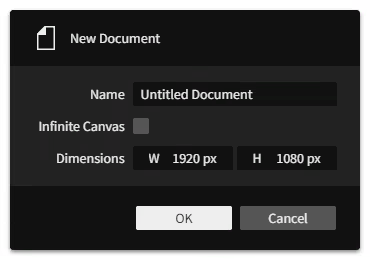
| New… | Opens the New Document dialog for creating a blank canvas in a new editor tab.
|
| Open… | Opens the operating system file picker dialog for selecting a |
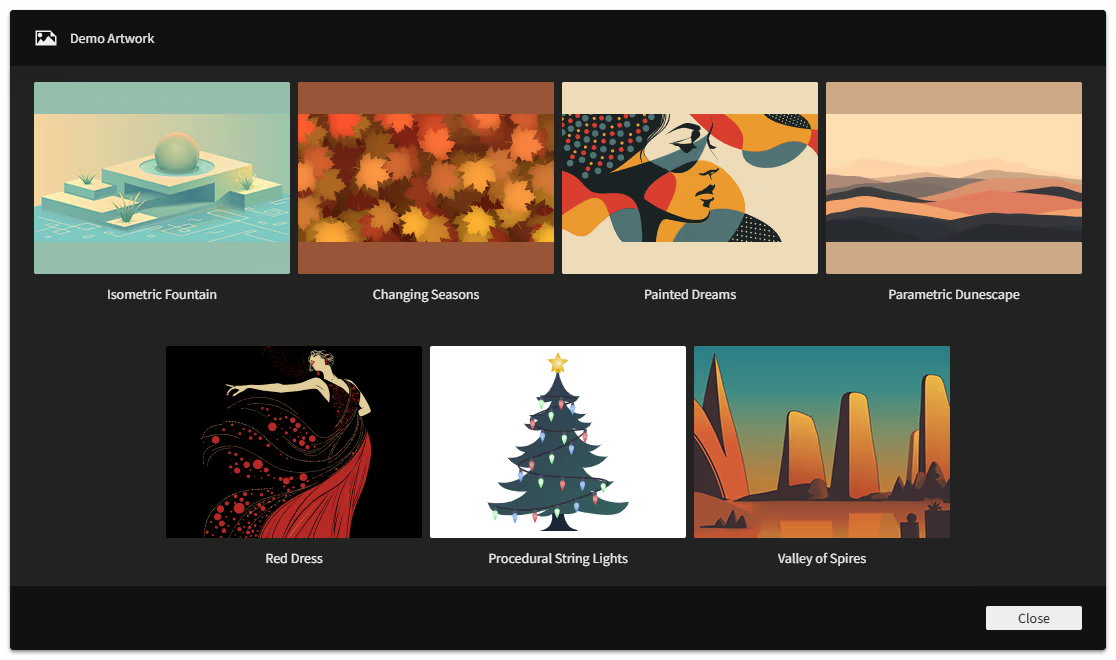
| Open Demo Artwork… | Opens the Demo Artwork dialog for loading a choice of premade sample artwork files provided for you to explore. Click the button below each image to open it.
|
| Close | Closes the active document. If it has unsaved changes (denoted by the |
| Close All | Closes all open documents. To avoid accidentally losing unsaved work, you will be asked to confirm that you want to proceed which will discard the unsaved changes in all open documents. |
| Save | Saves the active document by writing the |
| Import… | Opens the operating system file picker dialog for selecting an image file from disk to be placed as a new bitmap image layer or SVG content into the active document. |
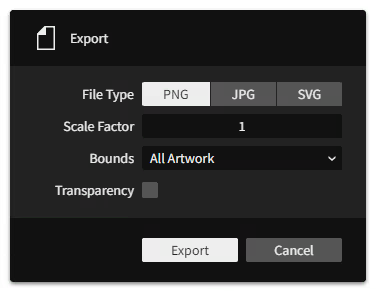
| Export… | Opens the Export dialog for saving the artwork as a File Type of PNG, JPG, or SVG. Scale Factor multiplies the content's document scale, so a value of 2 would export 300x400 content as 600x800 pixels. Bounds picks what area to render: All Artwork uses the bounding box of all layers, Selection uses the bounding box of the currently selected layers, and an Artboard: [Name] uses the bounds of that artboard. |
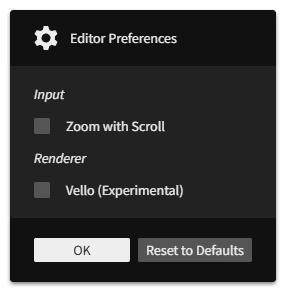
| Preferences… | Opens the Editor Preferences dialog for configuring Graphite's settings. |
Edit
The Edit menu lists actions related to the editing workflow:
| Undo | Steps back in the history of changes in the active document. |
| Redo | Steps forward in the history of changes in the active document. |
| Cut | Copies the selected layer(s) to the clipboard, then deletes them. |
| Copy | Copies the selected layer(s) to the clipboard. |
| Paste | Pastes the copied layer(s) from the clipboard into the document. It will end up directly above the selected layer, or otherwise at the base of the folder structure. In the web version of Graphite, your browser will ask for permission to read from your clipboard which you must grant; alternatively, using the hotkey CtrlV (macOS: ⌘V) works without the browser needing this permission. |
| Duplicate | Creates a copy of the selected layer(s) directly above their original(s) in the layer stack. |
| Delete | Removes all selected layers and folders. |
| Convert to Infinite Canvas | Replaces all artboards in the document with standard layers. With no artboards present, the document becomes an infinite canvas. |
Layer
The Layer menu lists actions related to the layers within a document:
| New | Creates a new layer in the active document. It will end up directly above the selected layer, or otherwise at the base of the folder structure. |
| Group | Creates a new folder in place of the selected layer(s), then moves them into that folder. |
| Ungroup | Removes the selected folder(s), moving their contents up one level in the layer stack. |
| Hide/Show | Toggles visibility of the selected layer(s), including or excluding them from rendering as part of the artwork. |
| Lock/Unlock | Toggles the locked state of the selected layer(s), preventing them from being selected by tools in the viewport. |
| Grab | Begin grabbing the selected layer(s) to translate (move) them around with your cursor's movement. Lock to an axis with X or Y then use the number keys to type a pixel distance value. Confirm with a left click or Enter. Cancel with a right click or Esc. |
| Rotate | Begin rotating the selected layer(s) around their pivot point with your cursor's movement. Use the number keys to type an angle value in degrees. Confirm with a left click or Enter. Cancel with a right click or Esc. |
| Scale | Begin scaling the selected layer(s) around their pivot point with your cursor's movement. Lock to an axis with X or Y. Use the number keys to type a scale multiplier value. Confirm with a left click or Enter. Cancel with a right click or Esc. |
| Arrange > Raise to Front |
Reorders the selected layer(s) above all others within their same folder(s), so they appear in the layer stack and render above those other layers. |
| Arrange > Raise |
Reorders the selected layers(s) up by one in the layer stack, so any layer that was immediately above the selected layer(s) ends up immediately below. |
| Arrange > Lower |
Reorders the selected layers(s) down by one in the layer stack, so any layer that was immediately below the selected layer(s) ends up immediately above. |
| Arrange > Lower to Back |
Reorders the selected layer(s) below all others within their same folder(s), so they appear in the layer stack and render below those other layers. |
| Arrange > Reverse |
Reorders the selected layers by swapping their positions from top to bottom. Reversal applies amongst each set of selected sibling layers (those with a shared parent). |
| Align > Align Left |
Moves the selected layer(s) so their left edges line up with the leftmost edge of the selection's bounding box. |
| Align > Align Horizontal Center |
Moves the selected layer(s) so their horizontal centers line up with the horizontal center of the selection's bounding box. |
| Align > Align Right |
Moves the selected layer(s) so their right edges line up with the rightmost edge of the selection's bounding box. |
| Align > Align Top |
Moves the selected layer(s) so their top edges line up with the topmost edge of the selection's bounding box. |
| Align > Align Vertical Center |
Moves the selected layer(s) so their vertical centers line up with the vertical center of the selection's bounding box. |
| Align > Align Bottom |
Moves the selected layer(s) so their bottom edges line up with the bottommost edge of the selection's bounding box. |
| Flip > Flip Horizontal |
Reflects the selected layer(s) horizontally within the selection's bounding box. |
| Flip > Flip Vertical |
Reflects the selected layer(s) vertically within the selection's bounding box. |
| Turn > Turn -90° |
Rotates the selected layer(s) a quarter turn counterclockwise about the selection's bounding box center. |
| Turn > Turn 90° |
Rotates the selected layer(s) a quarter turn clockwise about the selection's bounding box center. |
| Boolean > Union |
Combines all paths of the selected vector layer(s) while cutting out overlapping areas (even the interiors of a single path) |
| Boolean > Subtract Front |
Cuts overlapping areas out from the last of the selected vector layers. |
| Boolean > Subtract Back |
Cuts overlapping areas out from the first of the selected vector layers. |
| Boolean > Intersect |
Cuts away all but the overlapping areas shared by every path of the selected vector layer(s). |
| Boolean > Difference |
Cuts away the overlapping areas shared by every path of the selected vector layer(s), leaving only the non-overlapping areas. |
| Make Path Editable | Applies a path edit operation (the Path node) to the selected vector layer, capturing the geometry after other nondestructive operations to enable its direct modification by the Path and Pen tools. |
Select
The Select menu lists actions related to the selection of layers within a document:
| Select All | Selects all layers and folders in the document. |
| Deselect All | Deselects everything in the document. |
| Select Parent | Selects the parent folder(s) of the currently selected layer(s). |
| Previous Selection | Goes back to the previously selected set of layers or nodes in the selection history. If the side of your mouse has navigation buttons, you can use the back button as a shortcut (not supported in Firefox). |
| Next Selection | Goes forward to the next selected set of layers or nodes in the selection history. If the side of your mouse has navigation buttons, you can use the forward button as a shortcut (not supported in Firefox). |
View
The View menu lists actions related to the view of the canvas within the viewport:
| Tilt | Begins tilting the viewport angle based on your mouse movements. While tilting, hold Shift to snap to 15° increments. Confirm with a left click or Enter. Cancel with a right click or Esc. |
| Reset Tilt | Sets the viewport tilt angle back to 0°. |
| Zoom In | Narrows the view to the next whole zoom increment, such as: 25%, 33.33%, 40%, 50%, 66.67%, 80%, 100%, 125%, 160%, 200%, 250%, 320%, 400%, 500% |
| Zoom Out | Widens the view to the next whole zoom increment, such as above. |
| Zoom to Selection | Zooms and frames the viewport to the bounding box of the selected layer(s). |
| Zoom to Fit | Zooms and frames the viewport to fit all artboards, or all artwork if using infinite canvas. |
| Zoom to 100% | Zooms the viewport in or out to 100% scale, making the document and viewport scales match 1:1. |
| Zoom to 200% | Zooms the viewport in or out to 200% scale, displaying the artwork at twice the actual size. |
| Flip | Mirrors the viewport horizontally, flipping the view of the artwork until deactivated. |
| Rulers | Toggles visibility of the rulers along the top/left edges of the viewport. |
Window
The Window menu lists actions related to the visibility of workspace panels within the application window:
| Properties | Toggles visibility of the Properties panel on the upper-right side of the workspace. It is used to inspect and edit the values of graphics operation (node) parameters. Selected layers or nodes display their parametric controls in this panel. |
| Layers | Toggles visibility of the Layers panel on the lower-right side of the workspace. It is used to organize and select the artboards and layers that form the structure of a document. |
| Data | Toggles visibility of the Data panel on the lower-left side of the workspace. It is used to introspect data flow from the output of a selected node for technical debugging of content generated within the node graph. |
Help
The Help menu lists actions related to information about Graphite:
| About Graphite… | Opens the About Graphite dialog for displaying release and license information. You can check it for the release date of the current editor version. |
| User Manual | Opens this user manual. |
| Donate to Graphite | Opens the Graphite development fund page where you can contribute financially to support ongoing development of the project. |
| Report a Bug | Opens a page to file a new GitHub issue. |
| Visit on GitHub | Opens the Graphite GitHub repository. |
| Developer Debug | A section with developer-only actions. Users should ignore these. |